
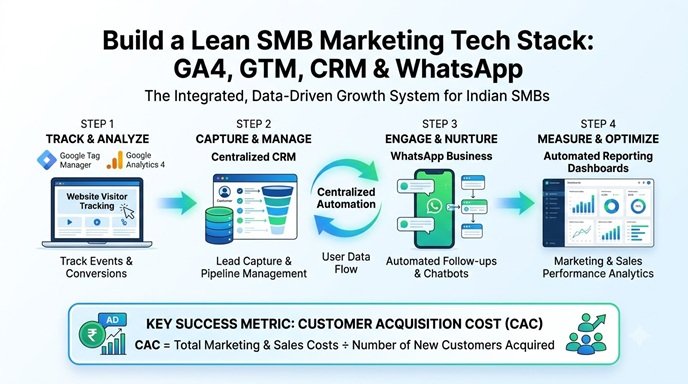
Most SMBs I audit do not have a tools problem. They have a connection problem. Leads arrive from Google Ads, a form plugin emails them to one person, the sales team logs them in a spreadsheet, and the owner asks at month-end why the cost per sale cannot be calculated. Each tool works alone, and nothing shares data. Vanity metrics like raw impressions don’t pay bills; qualified conversions do, and you can only count those when your tools pass data to each other. This guide explains how to build a lean marketing tech stack where every tool earns its place and actually integrates.
What Is a Marketing Tech Stack and What Does Integration Mean?
A marketing tech stack is the set of software you use to attract, capture, convert and retain customers. Integration means data moves between these tools automatically, with a consistent customer identifier, so you can trace revenue back to its source.
Definition block:
- Native integration: A built-in connection supported by the vendor (for example, linking GA4 to Google Ads).
- API or webhook integration: A connection built with code or an automation platform, where one tool sends data to another when an event occurs.
- Single source of truth: One system (usually a CRM or database) treated as the final record of leads and revenue.
Before spending a single rupee on new software, make sure you can describe how a lead travels from first click to paid invoice. If you cannot draw that path, adding tools will make the confusion more expensive.
The Five Layers of an SMB Marketing Stack
A healthy SMB stack has five layers: website, tracking, lead capture and CRM, communication, and reporting. Start with one tool per layer. Add more only when a specific bottleneck demands it.
| Layer | Job | Typical Options | Integration Priority |
| Website and CMS | Host content, forms, schema | WordPress, Shopify, custom PHP | Clean forms, fast pages, data layer |
| Tracking | Measure behaviour and conversions | GA4, Google Tag Manager, Search Console | Events tied to Google Ads and CRM |
| Lead capture and CRM | Store leads, track pipeline | Zoho CRM, HubSpot, Freshsales, or a structured sheet | Receives UTM and click ID data |
| Communication | Follow up and retain | WhatsApp Business Platform, email service, SMS | Triggered from CRM stages |
| Reporting | Combine spend and revenue | Looker Studio, BigQuery, spreadsheets | Pulls from ads, GA4 and CRM |
For a typical Indian business targeting local or pan-India buyers, the communication layer deserves extra attention. Calls and WhatsApp drive a large share of enquiries, and a stack that ignores them will undercount real conversions.
How to Evaluate Whether a Tool Really Integrates
A tool integrates well if it offers a documented native connector or API, supports two-way data flow, and lets you export your data without penalty. Marketing pages promise “100+ integrations” while the real connection may only send a notification email.
Use this checklist before you buy:
- Direction: Does data flow one way or both ways? A CRM that only receives leads but cannot send stage updates back to Google Ads limits your optimisation.
- Fields: Can it carry UTM parameters, click IDs, phone numbers and custom fields?
- Speed: Is sync real-time, scheduled or manual? Lead response time matters, so a 24-hour sync is a problem.
- Limits: Check API rate limits, record caps and which integrations sit behind higher plans.
- Compliance: Where is data stored, and does the vendor support consent records under India’s DPDP Act (and GDPR for overseas visitors)?
- Exit cost: Can you export contacts and history in CSV or via API?
Evaluate tools on features, technical accuracy, usability and total cost. Brand reputation and affiliate commissions should not enter the decision.
Technical Implementation: Connecting the Core Stack
Connect the stack in this order: tracking first, lead capture second, CRM third, automation fourth, reporting last. Fixing data capture at the source is cheaper than cleaning it afterwards.
Step 1: Build a Clean Tracking Foundation
From a technical SEO standpoint, start with Search Console and GA4, then deploy everything else through Google Tag Manager so you avoid pasting scripts into theme files. Link GA4 with Google Ads and Search Console, and define conversion events such as generate_lead, call_click, whatsapp_click and purchase.
A simple data layer push for WhatsApp clicks:
javascript
window.dataLayer = window.dataLayer || [];
document.querySelectorAll(‘a[href*=”wa.me”]’).forEach(function (el) {
el.addEventListener(‘click’, function () {
window.dataLayer.push({
event: ‘whatsapp_click’,
link_location: el.dataset.location || ‘unknown’
});
});
});
In GTM, create a custom event trigger for whatsapp_click and send it to GA4. Mark only your genuine business outcomes as key events, otherwise your bidding will optimise toward noise.
Step 2: Capture Source Data Inside Every Form
Most lead forms lose the traffic source the moment someone clicks submit. Add hidden fields that store UTM parameters and the Google click ID (gclid):
javascript
const params = new URLSearchParams(window.location.search);
[‘utm_source’, ‘utm_medium’, ‘utm_campaign’, ‘gclid’].forEach(function (key) {
const field = document.querySelector(‘input[name=”‘ + key + ‘”]’);
if (field && params.get(key)) field.value = params.get(key);
});
Because click IDs expire from the URL after the first page, store them in a first-party cookie or session so they survive navigation. Use a consent banner before setting any non-essential cookies.
Step 3: Push Leads Into One CRM
Connect your WordPress form plugin to your CRM through a native connector or webhook, and map each hidden field to a CRM field. Standardise your pipeline stages: New, Contacted, Qualified, Quote Sent, Won, Lost. Without consistent stages, reporting is guesswork.
Step 4: Send Sales Outcomes Back to Google Ads
When a deal closes by phone call or in a showroom, upload that outcome as an offline conversion using the stored click ID, or use enhanced conversions for leads where it fits your setup. This lets Smart Bidding learn from real sales instead of form fills. Do not send raw personal data to GA4, since Google Analytics policy prohibits it.
Step 5: Automate Follow-Up
Use the CRM’s workflows, or an automation platform such as Zapier, Make or n8n, to trigger actions: instant WhatsApp acknowledgement (with opt-in and approved templates), a task for the sales rep, and a reminder if nobody calls within 30 minutes. SMS in India requires DLT registration, so plan for that lead time.
Step 6: Report in One Place
Use Looker Studio for dashboards, and consider the free GA4 BigQuery export if you need row-level analysis. Pull ad spend, GA4 conversions and CRM revenue into a single view. Keep the dashboard to six or seven metrics: spend, leads, qualified leads, cost per qualified lead, CAC, revenue and ROAS.
Calculating Stack Cost and Return
Judge your stack by cost per acquired customer and hours saved, not by the number of features. Include software, labour and ad spend.
- CAC = total marketing and sales cost ÷ new customers acquired
- ROAS = (revenue generated from ads ÷ total ad spend) × 100
- Tool break-even = monthly tool cost ÷ profit per additional customer it helps win
A simple calculation can help project your customer acquisition cost. Assume ₹60,000 in ad spend, ₹18,000 in tools and ₹40,000 in marketing labour in a month, with 30 new customers. CAC = 118,000 ÷ 30 = about ₹3,933. If gross profit per customer is ₹9,000, the channel is healthy.
Now test a new tool. A follow-up automation costs ₹5,000 a month. If each recovered customer earns ₹2,000 profit, the tool breaks even at 2.5 extra customers a month. Ask whether your lead leakage is large enough to deliver that. If not, skip it. These figures are assumptions for illustration, so replace them with your own data.
Practical Example: A Lucknow Appliance and Electrical Dealer
Consider an illustrative scenario, not client data: a dealer selling air coolers, inverters and electrical services, running Google Ads and a Google Business Profile.
Assumed starting point: enquiries come through a contact form, call button and WhatsApp. Calls are not tracked, form leads go to email, and nobody knows which keyword produced a sale.
The lean integrated stack:
- WordPress with a fast theme, LocalBusiness and Product schema, and a sticky call and WhatsApp bar.
- GTM and GA4 tracking form submits, call clicks and WhatsApp clicks, linked to Google Ads.
- A CRM (or a structured Google Sheet at very low volume) receiving every lead with UTM and click ID fields.
- WhatsApp Business for acknowledgements and seasonal service reminders to opted-in customers.
- Looker Studio showing spend, qualified leads and closed sales by campaign.
The result is not a promised ranking or revenue jump. It is visibility: the owner can see that, say, one cooler campaign produces cheap form fills that rarely close, while a service-area campaign produces fewer but better leads. Budget can then move to what actually sells.
Choosing Tools by Business Stage
Pick the simplest stack that handles your lead volume, and upgrade when a specific constraint appears.
| Business Stage | Monthly Leads | Suggested Approach | Watch Out For |
| Startup or single outlet | Under 100 | GA4, GTM, Search Console, WhatsApp Business app, structured sheet or free CRM tier | Manual copy-paste errors |
| Growing SME | 100 to 500 | Dedicated CRM, form-to-CRM sync, email and WhatsApp automation | Plan limits on integrations |
| Multi-location or high volume | 500 plus | CRM with API access, BigQuery, WhatsApp API provider, call tracking | Data governance and consent |
For tool comparisons such as Zoho versus HubSpot, or Semrush versus Ahrefs, test with your real workflow during a trial period. Vendor pricing and plan limits change often, so verify current terms before committing.
Common Blunders and Black-Hat Pitfalls
The most expensive stack mistakes are tool overload, broken tracking and consent shortcuts.
- Buying tools before defining the funnel. Ten subscriptions with no data flow equals ten silos.
- Duplicate tracking. Hard-coded GA4 plus GTM GA4 inflates conversions and distorts bidding.
- No UTM discipline. Inconsistent naming turns campaign reports into noise.
- Counting every event as a conversion. Scroll depth is not a sale.
- Purchased phone lists loaded into WhatsApp or SMS tools. This breaches consent norms, risks number bans and invites legal exposure under the DPDP Act.
- Sending personal data to GA4 or uploading customer lists to ad platforms without valid consent.
- Fake reviews through automation. In white-hat digital marketing, review requests must be genuine and non-incentivised.
- Scraping competitor data or using cloaking and doorway pages to boost visibility. These risk Google penalties and domain suppression.
- Ignoring backups and access control. Shared logins and unrecorded admin changes cause data loss.
Actionable Conclusion and Next Steps
A good marketing tech stack is small, connected and measurable. Your actual search rank and quality score will depend on relevance, content and landing page experience, and the stack’s job is to show you what is working. Start here:
- Map the lead path from first click to paid invoice and mark where data is lost.
- Set up GTM with GA4 events for forms, calls and WhatsApp, and link GA4 to Google Ads.
- Add hidden UTM and click ID fields to every form.
- Route all leads into one CRM with standard pipeline stages.
- Build a one-page Looker Studio dashboard showing cost per qualified lead and CAC.
- Review the stack quarterly and remove any tool that nobody uses.
Frequently Asked Questions
What is the best marketing tech stack for a small business in India?
There is no single best stack. A practical baseline is WordPress or Shopify, GA4 with Google Tag Manager, Search Console, a CRM, WhatsApp Business and Looker Studio. Choose tools that match your lead volume and integrate with each other.
How many marketing tools does an SMB really need?
Often five to eight. One tool per layer (website, tracking, CRM, communication, reporting) is enough at the start. Add tools only to solve a documented bottleneck.
Is a CRM necessary for a small business?
Not at very low volume, where a well-structured spreadsheet can work. Once you handle dozens of leads a week, or need follow-up automation and offline conversion tracking, a CRM becomes worthwhile.
How do I connect Google Ads with my CRM?
Capture the Google click ID in a hidden form field, store it in the CRM, and upload sales outcomes as offline conversions, or use enhanced conversions for leads where suitable. Check Google Ads documentation for current requirements.
Can I use WhatsApp for marketing automation legally in India?
Yes, with user opt-in, approved message templates on the WhatsApp Business Platform and honest content. Avoid unsolicited bulk messaging to purchased lists.
Are free tools enough for SMB marketing?
Often for measurement. GA4, Tag Manager, Search Console and Looker Studio are free. Paid tools make sense for CRM automation, WhatsApp API access or large-scale SEO research, once you have calculated the payback.What is the biggest integration mistake SMBs make?
Failing to pass source data (UTMs and click IDs) into the CRM. Without it, you can count leads but cannot link them to revenue or campaigns

Amit Tyagi is a seasoned Digital Marketing and SEO Consultant with extensive experience helping businesses improve online visibility through SEO, AI Search Optimization (AIO/GEO), content strategy, and performance marketing. He regularly shares practical insights, industry updates, and data-driven strategies, empowering brands and marketers to achieve sustainable digital growth in an evolving search landsca