
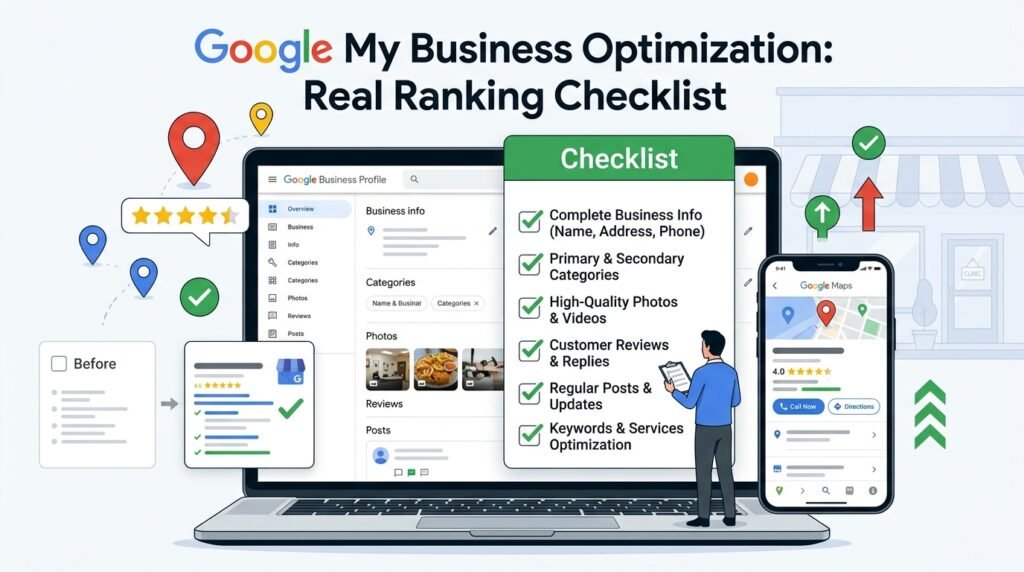
Introduction to Google My Business Optimization
As a digital marketing strategist and SEO consultant, I have worked with numerous businesses to improve their online presence and increase their visibility in search engine results. One crucial aspect of local SEO is Google My Business optimization, which plays a significant role in helping businesses rank higher in local search results. Google My Business is a free tool that allows businesses to manage their online presence across Google, including Google Maps and Google Search. In this article, we will delve into the world of Google My Business optimization and provide a comprehensive checklist to help businesses improve their local search rankings.
Google My Business optimization is essential for businesses that want to attract local customers. When a user searches for a product or service in a specific location, Google’s algorithm takes into account various factors, including the business’s proximity to the user, its relevance to the search query, and its online presence. By optimizing their Google My Business listing, businesses can increase their chances of appearing in the top results, driving more traffic to their website, and ultimately, generating more sales.
A well-optimized Google My Business listing can also help businesses build credibility and trust with their target audience. A complete and accurate listing can provide users with the information they need to make informed decisions, such as the business’s hours of operation, address, and phone number. Moreover, a Google My Business listing allows businesses to respond to customer reviews, which is an essential aspect of reputation management.
For instance, let’s consider a hypothetical example of a coffee shop in New York City. If a user searches for “coffee shops near me” in Manhattan, Google’s algorithm will take into account the user’s location and provide a list of nearby coffee shops. If the coffee shop has an optimized Google My Business listing, it is more likely to appear in the top results, along with its hours of operation, address, and phone number. This can help the coffee shop attract more customers and increase its sales.
To optimize a Google My Business listing, businesses need to follow a series of steps, which we will outline in this article. From claiming and verifying their listing to optimizing their profile and responding to customer reviews, we will provide a comprehensive checklist to help businesses improve their local search rankings. By following these steps, businesses can increase their online visibility, drive more traffic to their website, and ultimately, generate more sales.
Before we dive into the checklist, it’s essential to understand the importance of Google My Business optimization. According to Google, 76% of people who search for something nearby on their smartphone visit a related business within a day, and 28% of these searches result in a purchase. Moreover, businesses that have a complete and accurate Google My Business listing are 2.7 times more likely to be considered reputable by customers. These statistics highlight the significance of Google My Business optimization and the impact it can have on a business’s bottom line.
In the next section, we will provide a comprehensive checklist for Google My Business optimization, including tips and best practices for claiming and verifying a listing, optimizing a profile, and responding to customer reviews. By following these steps, businesses can improve their local search rankings, increase their online visibility, and drive more traffic to their website.
Some of the key aspects of Google My Business optimization that we will cover in this article include:
- Claiming and verifying a Google My Business listing
- Optimizing a business profile, including adding a business description, hours of operation, and contact information
- Responding to customer reviews and managing online reputation
- Using Google My Business posts to share updates and promotions
- Monitoring and analyzing Google My Business insights to track performance and make data-driven decisions
By covering these aspects and providing a comprehensive checklist, we aim to help businesses improve their Google My Business optimization and increase their local search rankings. Whether you’re a small business owner or a digital marketing professional, this article will provide you with the knowledge and expertise you need to optimize your Google My Business listing and drive more traffic to your website.
Setting Up and Claiming Google My Business Listing
As a digital marketing strategist and SEO consultant, I have worked with numerous businesses to help them improve their online presence and increase their visibility in search results. One of the most critical steps in this process is setting up and claiming a Google My Business listing. In this section, we will explore the importance of Google My Business and provide a step-by-step guide on how to set up and claim your listing.
Google My Business is a free tool that allows businesses to manage their online presence across Google, including Google Search and Google Maps. By claiming and optimizing your Google My Business listing, you can increase your chances of appearing in the top search results for your business name and other relevant keywords. This can help drive more traffic to your website, increase phone calls and foot traffic to your store, and ultimately boost your revenue.
To set up and claim your Google My Business listing, follow these steps:
- Create a Google account if you don’t already have one. This will be used to manage your Google My Business listing.
- Go to the Google My Business website and sign in with your Google account.
- Enter your business name and address in the search bar. If your business doesn’t appear in the search results, you can add it by clicking on the “Add a business” button.
- Verify your business by phone or email. Google will send a verification code to the phone number or email address associated with your business. Enter the code to verify your business.
- Complete your business profile by adding your business hours, categories, and description. You can also add photos and videos to showcase your business.
It’s essential to note that Google My Business has specific guidelines that businesses must follow to ensure their listing is approved. These guidelines include:
- Using a precise and accurate business name and address.
- Avoiding the use of keywords in your business name.
- Not using PO boxes or mailboxes as your business address.
- Not creating multiple listings for the same business.
For example, let’s say you have a law firm called “Smith and Associates” located at “123 Main Street, New York, NY 10001.” Your Google My Business listing should reflect this exact name and address. You should avoid using keywords like “New York Lawyers” in your business name, as this can be seen as spammy and may result in your listing being rejected.
Once you have set up and claimed your Google My Business listing, you can start optimizing it to improve your online presence. This includes regularly posting updates and offers, responding to customer reviews, and using the built-in analytics tool to track your performance. By following these steps and guidelines, you can ensure that your Google My Business listing is accurate, complete, and optimized for success.
In addition to setting up and claiming your Google My Business listing, it’s also essential to understand the different types of Google My Business listings and how they can impact your online presence. For instance, if you have multiple locations, you can create separate listings for each location. This can help you target specific geographic areas and increase your visibility in local search results.
Another important aspect of Google My Business is the use of categories. Categories help Google understand what your business does and what products or services you offer. By selecting the most relevant categories for your business, you can increase your chances of appearing in the top search results for related keywords. For example, if you have a restaurant, you can select categories like “Restaurant,” “Italian Restaurant,” or “Fine Dining.” This can help you attract more targeted traffic and increase your online visibility.
Finally, it’s crucial to keep your Google My Business listing up-to-date and accurate. This includes regularly updating your business hours, address, and contact information. You should also respond promptly to customer reviews and use the built-in messaging feature to communicate with customers. By doing so, you can build trust and credibility with your customers, improve your online reputation, and increase your chances of attracting new customers.
In conclusion, setting up and claiming a Google My Business listing is a critical step in improving your online presence and increasing your visibility in search results. By following the steps outlined in this section, you can ensure that your Google My Business listing is accurate, complete, and optimized for success. Remember to regularly update your listing, respond to customer reviews, and use the built-in analytics tool to track your performance. With a well-optimized Google My Business listing, you can drive more traffic to your website, increase phone calls and foot traffic to your store, and ultimately boost your revenue.
As a digital marketing strategist and SEO consultant, I have seen firsthand the impact that a well-optimized Google My Business listing can have on a business. By following the guidelines and best practices outlined in this section, you can take the first step towards improving your online presence and increasing your visibility in search results. Whether you’re a small business owner or a large corporation, a well-optimized Google My Business listing is essential for attracting new customers, building trust and credibility, and driving revenue growth.
In the next section, we will explore the importance of optimizing your Google My Business listing for search and provide tips and best practices for improving your online visibility. We will also discuss the role of reviews and ratings in Google My Business and provide strategies for encouraging customers to leave reviews and improving your overall rating.
Google My Business Optimization Strategies
As a digital marketing strategist and SEO consultant, I have seen firsthand the impact that Google My Business optimization can have on a company’s online visibility and revenue. With over 15 years of experience in the field, I have developed a comprehensive understanding of the strategies and techniques that are necessary to optimize a Google My Business listing and improve a company’s search engine rankings. In this article, we will explore the importance of Google My Business optimization and provide a real ranking checklist that businesses can use to improve their online presence.
Google My Business is a free tool that allows businesses to manage their online presence and provide customers with accurate and up-to-date information about their company. By optimizing their Google My Business listing, businesses can improve their search engine rankings, increase their online visibility, and drive more traffic to their website. However, with so many businesses competing for attention online, it can be difficult to stand out and get noticed. This is where a well-optimized Google My Business listing can make all the difference.
A well-optimized Google My Business listing can help businesses to establish their brand identity, build trust with their customers, and drive more sales and revenue. It can also help businesses to improve their local search engine rankings, which is especially important for businesses that rely on local customers. By including accurate and up-to-date information about their business, such as their hours of operation, address, and contact information, businesses can make it easier for customers to find them and get in touch.
In addition to providing customers with accurate and up-to-date information, a well-optimized Google My Business listing can also help businesses to build trust and credibility with their customers. This can be achieved by responding promptly to customer reviews and feedback, and by using the listing to share news and updates about the business. By doing so, businesses can demonstrate their commitment to their customers and show that they value their feedback and opinions.
So, how can businesses optimize their Google My Business listing and improve their search engine rankings? Here are some strategies that can help:
- Claim and verify your listing: The first step in optimizing your Google My Business listing is to claim and verify it. This can be done by creating a Google My Business account and following the verification process. Once your listing is verified, you can start to optimize it by adding accurate and up-to-date information about your business.
- Optimize your business description: Your business description should be accurate, concise, and informative. It should include information about your business, such as your products or services, mission, and values. It should also include relevant keywords that customers might use when searching for your business.
- Add high-quality photos: High-quality photos can help to make your Google My Business listing stand out and attract more attention from potential customers. They can include photos of your business, products, or services, as well as photos of your team and customers.
- Respond promptly to customer reviews: Responding promptly to customer reviews is essential for building trust and credibility with your customers. It shows that you value their feedback and opinions, and are committed to providing them with the best possible service.
- Use Google My Business posts: Google My Business posts can be used to share news and updates about your business, such as new products or services, promotions, or events. They can help to keep your customers informed and engaged, and can also help to improve your search engine rankings.
By following these strategies, businesses can optimize their Google My Business listing and improve their search engine rankings. However, it’s also important to keep in mind that Google My Business optimization is an ongoing process that requires regular monitoring and maintenance. By staying on top of your listing and making updates as needed, you can help to ensure that your business remains visible and attractive to potential customers.
Another important aspect of Google My Business optimization is local SEO. Local SEO refers to the process of optimizing your website and online presence to attract more local customers. This can be achieved by including location-specific keywords in your website content, building high-quality local citations, and creating content that is relevant to your local audience.
For example, if you are a business that operates in New York City, you might include keywords such as “New York City” or “NYC” in your website content. You might also build local citations by listing your business in local directories and creating content that is relevant to your local audience, such as blog posts about local events or news.
By combining Google My Business optimization with local SEO, businesses can improve their online visibility and attract more local customers. This can be especially important for businesses that rely on local customers, such as restaurants, retail stores, and service providers.
In conclusion, Google My Business optimization is a crucial aspect of digital marketing that can help businesses to improve their online visibility and attract more customers. By claiming and verifying your listing, optimizing your business description, adding high-quality photos, responding promptly to customer reviews, and using Google My Business posts, businesses can establish their brand identity, build trust with their customers, and drive more sales and revenue. By also incorporating local SEO strategies, businesses can attract more local customers and improve their overall online presence.
As a digital marketing strategist and SEO consultant, I have seen firsthand the impact that Google My Business optimization can have on a company’s online visibility and revenue. By following the strategies outlined in this article, businesses can optimize their Google My Business listing and improve their search engine rankings, driving more traffic to their website and increasing their online presence.
Managing and Responding to Google My Business Reviews
As a digital marketing strategist, I have seen firsthand the importance of managing and responding to Google My Business reviews. This is a crucial aspect of Google My Business optimization, as it not only helps to build trust and credibility with potential customers, but also plays a significant role in determining your local search engine rankings. In this section, we will delve into the world of Google My Business reviews, exploring the best practices for managing and responding to them, and providing you with a comprehensive checklist to help you get started.
Google My Business reviews are a key component of your online presence, providing valuable social proof that can make or break a customer’s decision to choose your business. According to a recent study, 85% of consumers trust online reviews as much as personal recommendations, while 73% of consumers are more likely to trust a business with positive reviews. With this in mind, it is essential to take a proactive approach to managing and responding to Google My Business reviews, ensuring that your business is presented in the best possible light.
So, how do you manage and respond to Google My Business reviews? The first step is to claim and verify your Google My Business listing. This will provide you with access to the Google My Business dashboard, where you can view and respond to customer reviews. Once you have claimed and verified your listing, you can start to manage your reviews, responding promptly to both positive and negative feedback.
Responding to positive reviews is just as important as responding to negative ones. By thanking customers for their kind words and acknowledging their feedback, you can build strong relationships with your customers and encourage them to become loyal advocates for your business. On the other hand, responding to negative reviews provides an opportunity to address customer concerns, rectify any issues, and show that you value their feedback. This not only helps to resolve the issue at hand but also demonstrates to potential customers that you are committed to providing excellent customer service.
Here are some best practices to keep in mind when responding to Google My Business reviews:
- Respond promptly to all reviews, both positive and negative, within 24-48 hours.
- Be genuine and sincere in your responses, using a friendly and approachable tone.
- Keep your responses concise and to the point, avoiding lengthy or overly defensive comments.
- Use the opportunity to provide additional information or context, such as explaining a particular policy or procedure.
- Include a call-to-action, such as inviting the customer to contact you directly or visit your website.
For example, let’s say you own a restaurant and a customer leaves a negative review stating that their meal was cold and took too long to arrive. A potential response could be: “Sorry to hear that your meal was not up to our usual standards. We take food quality and service very seriously, and I would like to investigate this further. Can you please contact me directly so we can discuss this further and provide a suitable resolution?” This response acknowledges the customer’s concern, apologizes for the issue, and invites them to contact you directly to resolve the matter.
In addition to responding to reviews, it is also important to monitor your Google My Business reviews regularly. This will help you to stay on top of customer feedback, identify any trends or patterns, and make data-driven decisions to improve your business. You can use the Google My Business dashboard to view your reviews, or set up notifications to alert you when a new review is posted.
Another key aspect of managing Google My Business reviews is to encourage customers to leave reviews. This can be done by adding a link to your Google My Business listing on your website, including a call-to-action in your email newsletters, or even providing incentives for customers to leave reviews, such as discounts or free products. However, it is essential to note that Google has strict guidelines around review solicitation, and any attempts to manipulate or fake reviews can result in penalties or even suspension of your Google My Business listing.
Here are some ways to encourage customers to leave reviews without violating Google’s guidelines:
- Add a link to your Google My Business listing on your website, making it easy for customers to find and review your business.
- Include a call-to-action in your email newsletters or promotional materials, inviting customers to share their feedback.
- Provide excellent customer service, going above and beyond to ensure that customers are satisfied with their experience.
- Use social media to engage with customers and encourage them to share their feedback.
In conclusion, managing and responding to Google My Business reviews is a critical component of Google My Business optimization. By following the best practices outlined in this section, you can build trust and credibility with potential customers, improve your local search engine rankings, and drive more sales and revenue for your business. Remember to respond promptly to all reviews, be genuine and sincere in your responses, and monitor your reviews regularly to stay on top of customer feedback. With the right approach, you can turn Google My Business reviews into a powerful marketing tool that helps your business thrive.
Measuring and Tracking Google My Business Performance
As a digital marketing strategist, I have worked with numerous businesses to optimize their Google My Business listings and improve their online visibility. One crucial aspect of Google My Business optimization is measuring and tracking performance. In this section, we will delve into the importance of tracking Google My Business performance and provide a comprehensive checklist to help you get started.
Google My Business is a powerful tool that allows businesses to manage their online presence across Google, including Google Search and Maps. By claiming and optimizing your Google My Business listing, you can increase your chances of appearing in the local search results, drive more website traffic, and attract new customers. However, to maximize the benefits of Google My Business, you need to track your performance regularly.
Tracking your Google My Business performance helps you understand how your business is performing online, identify areas for improvement, and make data-driven decisions to optimize your listing. With the insights gained from tracking your performance, you can refine your marketing strategies, enhance your customer experience, and ultimately drive more sales and revenue.
So, how can you measure and track your Google My Business performance? The good news is that Google provides a built-in analytics tool, known as Google My Business Insights, which offers valuable data and metrics to help you understand your performance. Here are some key metrics to track:
- Views: The number of times your Google My Business listing has been viewed, including views on Google Search and Maps.
- Searches: The number of times your business has been searched for on Google, including direct searches, discovery searches, and branded searches.
- Actions: The number of actions taken by customers on your Google My Business listing, such as visiting your website, requesting directions, or making a phone call.
- Reviews: The number of reviews your business has received, including the overall rating and feedback from customers.
- Posts: The engagement and performance of your Google My Business posts, including views, clicks, and interactions.
By tracking these metrics, you can gain a deeper understanding of your Google My Business performance and identify areas for improvement. For example, if you notice that your listing is receiving a high number of views but low engagement, you may need to optimize your listing with more compelling content or offers. On the other hand, if you see a high number of actions but low conversions, you may need to refine your website or landing page to better meet the needs of your customers.
To illustrate the importance of tracking Google My Business performance, let’s consider a real-life example. Suppose you own a restaurant in New York City, and you have claimed and optimized your Google My Business listing. By tracking your performance, you notice that your listing is receiving a high number of views but low engagement. You decide to post more high-quality photos of your dishes and offer exclusive discounts to customers who book a table online. As a result, you see a significant increase in actions, including website visits and phone calls, and your overall revenue increases by 20%.
In addition to tracking your Google My Business performance, it’s essential to monitor your competitors’ performance as well. By analyzing your competitors’ listings and metrics, you can identify gaps in the market, opportunities to differentiate your business, and areas to improve your own performance. You can use tools like Google My Business Insights or third-party analytics tools to monitor your competitors’ performance and stay ahead of the competition.
Now that we have discussed the importance of measuring and tracking Google My Business performance, let’s create a comprehensive checklist to help you get started. Here’s a step-by-step guide to tracking your Google My Business performance:
- Claim and verify your Google My Business listing: If you haven’t already, claim your Google My Business listing and verify your business to access the analytics tool.
- Set up Google My Business Insights: Navigate to the Google My Business dashboard and set up Insights to start tracking your performance.
- Monitor your metrics regularly: Regularly check your Google My Business Insights to monitor your views, searches, actions, reviews, and posts.
- Analyze your performance data: Analyze your performance data to identify trends, patterns, and areas for improvement.
- Refine your marketing strategies: Based on your performance data, refine your marketing strategies to optimize your listing, improve engagement, and drive more conversions.
- Monitor your competitors’ performance: Use tools like Google My Business Insights or third-party analytics tools to monitor your competitors’ performance and stay ahead of the competition.
By following this checklist and regularly tracking your Google My Business performance, you can optimize your listing, improve your online visibility, and drive more sales and revenue. Remember, tracking your performance is an ongoing process that requires regular monitoring and analysis. By staying on top of your Google My Business performance, you can stay ahead of the competition and achieve your business goals.

Amit Tyagi is a seasoned Digital Marketing and SEO Consultant with extensive experience helping businesses improve online visibility through SEO, AI Search Optimization (AIO/GEO), content strategy, and performance marketing. He regularly shares practical insights, industry updates, and data-driven strategies, empowering brands and marketers to achieve sustainable digital growth in an evolving search landsca